

How To Check If My Resume Is ATS Readable
Getting past an Applicant Tracking System (ATS) is often the first hurdle in landing your dream job. According to industry research, over 75% of resumes never reach human eyes because they fail ATS screening.
If you’ve been applying to dozens of jobs with little response, your resume formatting might be the culprit.
How To Check If My Resume Is ATS Readable
Getting past an Applicant Tracking System (ATS) is the first and most critical step in landing a job today, because most employers use ATS software to automatically scan, rank, and reject resumes before a human ever sees them.
Studies consistently show that over 75% of resumes are filtered out by ATS systems, meaning formatting errors, missing keywords, or incompatible layouts can eliminate qualified candidates instantly.
If you’ve been submitting dozens of applications with little or no response, the issue is often not your experience or skills—but how your resume is structured and interpreted by ATS technology.
Modern ATS platforms are designed to parse specific formatting rules, section headers, and keyword patterns, and even small mistakes can prevent your resume from being read correctly.
Understanding how ATS screening works—and how to format your resume accordingly—is essential to getting past automated filters and into the hands of hiring managers.
What Makes a Resume ATS-Friendly?
An ATS-readable resume is a resume formatted in a way that Applicant Tracking Systems can accurately scan, interpret, and extract information such as job titles, dates, skills, and education.
ATS software analyzes resumes by identifying keywords, work history, and qualifications, then assigns a relevance score based on how closely each resume matches the job description.
Because these systems rely on structured data parsing—not visual design—complex layouts, graphics, columns, icons, tables, and unusual fonts often cause critical information to be misread or ignored entirely.
A resume that looks polished to a human reviewer can still fail ATS screening if the software cannot properly process its content, resulting in automatic rejection before a hiring manager ever sees it.
The Copy-Paste Test: Your First Quick Check
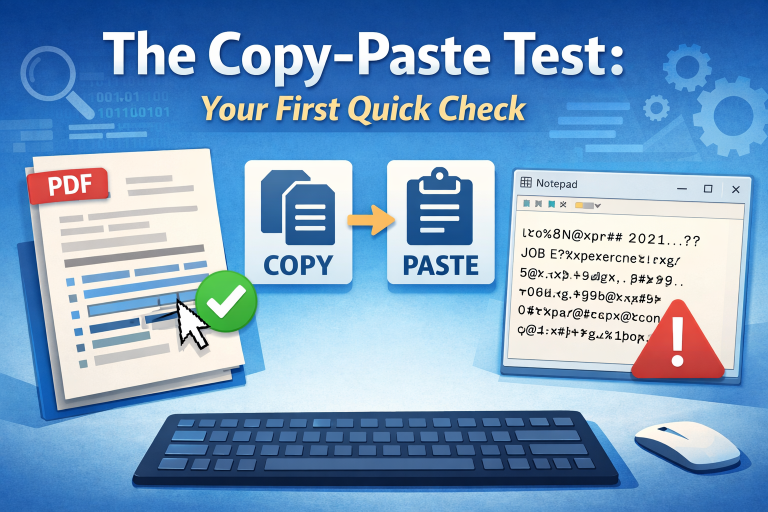
The simplest way to check if your resume is ATS-readable is to use the copy-and-paste test, which simulates how Applicant Tracking Systems extract text from resume files. To do this, open your resume PDF or Word document, select all the text, and paste it into a plain-text editor such as Notepad or TextEdit.
If the pasted content appears disorganized, contains random symbols, breaks job titles apart, or places dates out of order, an ATS will likely have difficulty parsing your resume correctly.
Critical details—such as your name, contact information, job titles, company names, and employment dates—should appear cleanly, in logical order, and without missing sections. If they don’t, your resume may be filtered out by ATS software before it ever reaches a recruiter.
Read more: Learn how resume parsing works behind the scenes, why certain formats fail ATS scans, and how to structure your resume so it’s read correctly every time.
Common ATS Resume Mistakes to Avoid
Headers and footers are frequent culprits for ATS failures. Many applicants place their contact information in the header, which some ATS software cannot read.
Always place your name, phone number, email, and LinkedIn profile in the main body of your document at the top.
Tables, text boxes, and columns also create problems. While they make resumes visually appealing, ATS software often reads tables from left to right across both columns, scrambling your carefully organized information. Stick to a single-column format with clear section headings.
Graphics, images, and logos are completely invisible to most ATS systems. That includes headshots, company logos, charts showing skill levels, and decorative elements. If information only exists as an image, the ATS won’t see it at all.
Unusual fonts and special characters can cause parsing errors. Use standard fonts like Arial, Calibri, or Times New Roman, and avoid using symbols for bullet points. Stick with simple round or square bullets that any system can recognize.
File Format Matters More Than You Think
Always submit your resume as a .docx file unless the job posting specifically requests PDF. While modern ATS systems handle PDFs better than older versions, .docx files remain the most universally compatible format.
If you created your resume in Google Docs, download it as a .docx file rather than PDF when applying.
Never submit your resume as a .pages file, image file, or any other uncommon format. These are almost guaranteed to fail ATS screening.
Essential Formatting Rules for ATS Success

Use standard section headings that ATS software recognizes. “Work Experience” or “Professional Experience” works better than creative alternatives like “Where I’ve Made an Impact.” The same applies to “Education,” “Skills,” and “Certifications.” Clear, conventional headings help the ATS categorize your information correctly.
List your work experience in reverse chronological order with consistent date formatting. Use “January 2020 – March 2023” or “01/2020 – 03/2023” rather than mixing formats.
Include your job title, company name, location, and dates for each position.
When describing your accomplishments, incorporate keywords from the job description naturally. If the posting mentions “project management,” use that exact phrase rather than “managed projects.”
ATS systems look for specific keyword matches, and synonyms don’t always register.
Free Tools to Test Your Resume
Several free online tools can analyze your ATS compatibility. Jobscan allows you to upload your resume alongside a job description and provides a match score with specific feedback.
Resume Worded offers a free ATS-friendly check that identifies formatting issues and missing keywords. These tools aren’t perfect, but they catch common problems before you submit applications.
You can also use free ATS simulators that show exactly how an ATS reads your resume. This reveals whether important information is being missed or misinterpreted.
Use our free resume tools to test ATS parsing, identify formatting problems, and see how your resume performs before submitting applications.
The Keyword Strategy That Actually Works
Start by carefully reading the job description and identifying required skills, qualifications, and experience.
Create a list of these keywords and phrases. Then naturally incorporate them throughout your resume where truthful and relevant.
Don’t just stuff keywords into a hidden white text section or create a meaningless keyword list. ATS systems have evolved to detect this tactic, and it can get your application rejected. Instead, weave keywords into your job descriptions and skills section authentically.
Include both acronyms and spelled-out versions of important terms. For example, “Search Engine Optimization (SEO)” covers applicants who search for either version. This small step can significantly improve your match rate.
Final Checklist Before Submitting
Before clicking submit, verify these elements: contact information appears in the document body, you’ve used a standard font between 10-12 points, section headings are clear and conventional, you’ve avoided tables and text boxes, your file is saved as .docx (unless PDF is requested), keywords from the job description appear naturally in your resume, and dates are formatted consistently throughout.
Most importantly, have someone else review your resume with fresh eyes. They’ll catch issues you’ve overlooked after staring at the document for hours.
The reality is that ATS systems are gatekeepers, not perfect evaluators of talent.
By following these formatting guidelines and regularly testing your resume’s readability, you significantly increase your chances of getting past this initial barrier and landing interviews with actual humans who can appreciate your full qualifications.
Quick Summary: Is Your Resume ATS-Ready?
✓ Use .docx format (unless PDF specifically requested)
✓ Place contact info in the document body, not headers/footers
✓ Avoid tables, columns, and text boxes – use single-column format
✓ Remove all graphics, images, and logos – ATS can’t read them
✓ Use standard fonts like Arial, Calibri, or Times New Roman
✓ Include keywords from job descriptions naturally throughout
✓ Test with the copy-paste method – paste into Notepad to check readability
✓ Use conventional section headings like “Work Experience” and “Education”
This article is essential reading if you’re experiencing any of these situations: you’ve been applying to multiple jobs but rarely hear back, you’re transitioning careers and submitting applications through online portals, you’re a recent graduate navigating corporate job applications for the first time, you’ve redesigned your resume with creative formatting and your response rate dropped, or you’re targeting positions at medium to large companies that use applicant tracking systems.
Whether you’re in tech, healthcare, finance, marketing, or any other field where online applications are standard, understanding ATS compatibility can dramatically improve your job search success rate.
Frequently Asked Questions
Can ATS systems read PDF resumes?
Modern ATS systems can read most PDFs, but compatibility varies. A PDF created from Word typically works fine, but PDFs made from design software like Photoshop or InDesign often fail. When in doubt, use .docx format unless the job posting specifically requests PDF.
How many keywords should I include in my resume?
There’s no magic number. Focus on naturally incorporating 10-15 relevant keywords from the job description throughout your resume. Quality and relevance matter more than quantity. Keyword stuffing is detectable and can hurt your chances.
Will a two-page resume pass ATS screening?
Yes, ATS systems have no problem with two-page resumes. The one-page rule is outdated for experienced professionals. However, make sure both pages contain relevant information and maintain consistent formatting throughout.
Do I need a different resume for every job application?
Ideally, yes. Tailoring your resume to match each job description’s specific keywords and requirements significantly improves your ATS match score. At minimum, customize your skills section and summary for each application.
Can ATS read bullet points?
Yes, but stick to standard bullet symbols (round or square). Avoid using custom symbols, images, or special characters as bullets. Most word processors’ default bullet options work perfectly fine.
What if the company asks for a creative resume?
Create two versions: an ATS-friendly version for online applications and a visually creative version for portfolio presentations or direct submissions to hiring managers. Always start with the ATS version for initial screenings.
How do I know if a company uses an ATS?
Most medium and large companies (50+ employees) use ATS systems. If you’re applying through an online portal where you upload your resume, an ATS is almost certainly screening it first. Small businesses and startups are less likely to use them.