
To make your resume ATS-friendly, you need a clean format, classic section titles like "Work Experience," and keywords pulled directly from the job description. The entire goal is to build a document that software can actually read and understand, making sure your qualifications get seen before a human ever lays eyes on it. Think clarity over creativity—that's how you pass this critical first test.
Why Your Resume Needs to Beat the Bots First
Long before a hiring manager reads about your amazing qualifications, your resume has to get past its toughest critic: an Applicant Tracking System (ATS). You can think of it as a digital gatekeeper for employers, programmed to scan, sort, and rank every single application that comes through.
That visually stunning resume you spent hours designing? The one with cool fonts and a creative layout? It might look incredible to you, but to an ATS, it can be a garbled, unreadable mess.
This is just the reality of hiring today. Companies get absolutely flooded with applications, and these systems are their first line of defense to manage the sheer volume. They're built to hunt for specific things—keywords, job titles, and a logical information flow. If your resume uses columns, tables, or non-standard headings, the software might completely fail to pull out your experience, skills, or even your contact info.
The Stark Reality of Resume Screening
The numbers don't lie. By 2025, an estimated 99% of Fortune 500 companies will use an ATS, and the trend has trickled down to businesses of all sizes. Even more shocking? Up to 75% of resumes are flat-out rejected by these systems before they ever reach a human, often because of simple formatting mistakes.
These two stats paint the entire picture of the modern job search.
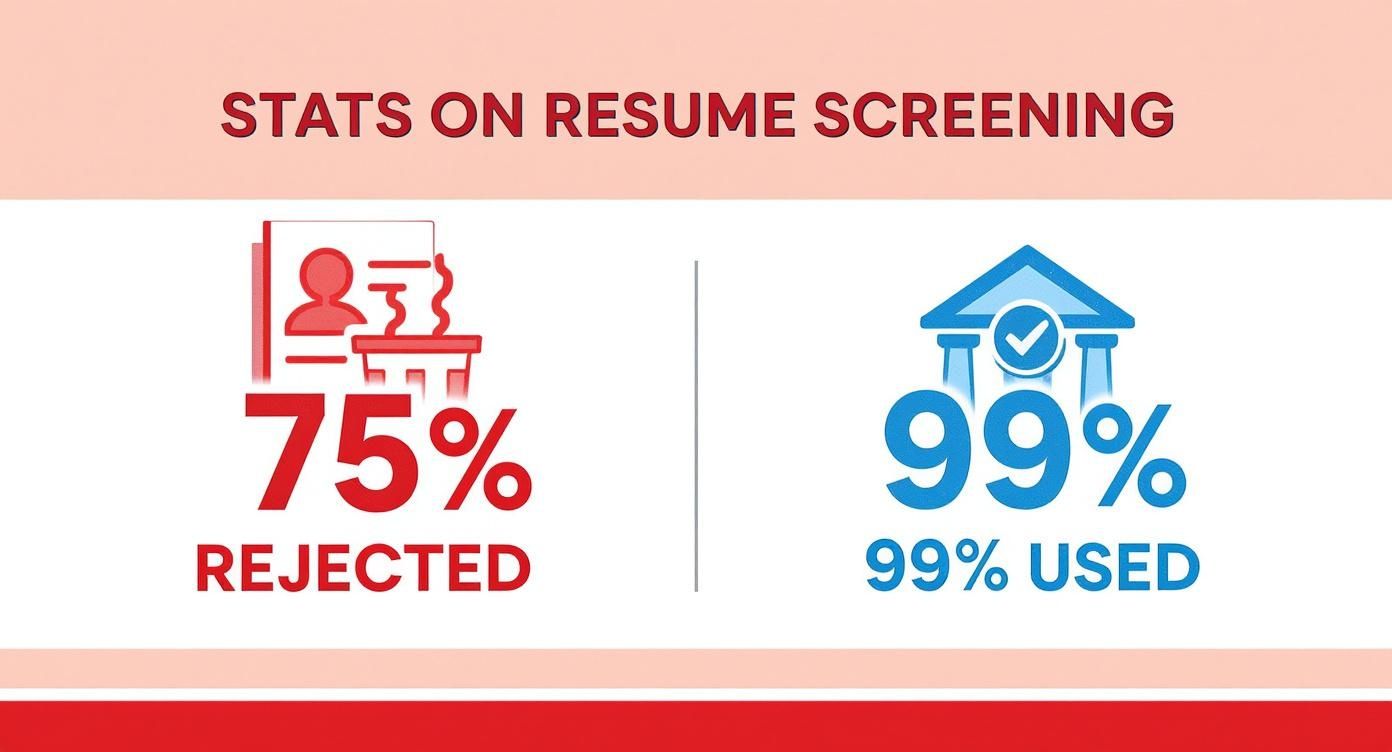
The key takeaway here is that your first challenge isn't impressing a person—it's getting past a machine.
Optimizing for Technology Is Not Optional
Countless qualified candidates get tossed into the "no" pile without ever knowing why, all because their resume wasn't built for a machine to read. And employers know it's a problem. A staggering 88% of them believe they lose out on good candidates simply because their applications aren't formatted for an ATS.
This means your resume has to serve two very different audiences: first the bot, then the boss.
An ATS-friendly resume doesn't mean a boring resume. It means structuring your achievements in a logical way so your value is crystal clear to both software and a human reviewer. It’s about prioritizing clarity over cleverness.
Failing to optimize for an ATS is like showing up to an interview and not speaking the same language as the hiring manager. You could be the perfect person for the job, but the message gets completely lost in translation. It's crucial to understand what recruiters look for in resumes, but none of that matters if your resume never makes it to their screen.
This guide will show you exactly how to make sure it does.
To see the difference clearly, here's a quick breakdown of what an ATS-friendly resume looks like compared to a more traditional, design-focused one.
ATS-Friendly vs. Traditional Resume At a Glance
| Feature | ATS-Friendly Approach (Recommended) | Traditional Approach (Avoid) |
|---|---|---|
| Formatting | Simple, single-column layout. Clean and linear flow. | Multi-column layouts, tables, and text boxes. |
| Fonts | Standard, sans-serif fonts (e.g., Arial, Calibri, Helvetica). | Stylized, script, or custom fonts that may not be readable. |
| Keywords | Tailored with keywords from the job description. | Generic language that isn't specific to the role. |
| File Type | .docx or .pdf (text-based). | Image-based PDFs, JPEGs, or other non-text formats. |
| Section Headings | Standard titles ("Work Experience," "Education," "Skills"). | Creative titles ("My Journey," "What I Can Do"). |
| Graphics | No logos, images, charts, or graphs. | Includes headshots, skill rating bars, or company logos. |
The takeaway is simple: keep it clean, scannable, and keyword-rich. By adopting the ATS-friendly approach, you ensure your resume gets parsed correctly, giving you the best possible shot at landing an interview.
Getting the Structure of Your ATS Resume Right
Before you even think about keywords or tailoring your experience, you need to nail the foundation: your resume's structure. Fancy designs and creative layouts might look great to us, but to an Applicant Tracking System, they're just noise. An ATS doesn't see your resume; it reads it, one line at a time, from top to bottom. If anything disrupts that simple flow, your application could end up in the digital trash can.
Think of it like giving a set of instructions to a very literal-minded robot. Every choice—from the font you pick to the way you save the file—either makes those instructions crystal clear or completely garbled. The goal is a clean, logical, and predictable document that lets the software pull out your professional story without a single hiccup.
This is the make-or-break step. Without a solid, parsable structure, even the most amazing experience can get lost in translation before a human ever sees it.
Choosing the Right Fonts and Sizes
When it comes to fonts, boring is best. Seriously. An ATS needs to recognize every character instantly, which means those cool script or decorative fonts are out. You need to stick with universally recognized, web-safe fonts that are standard on pretty much every computer.
Your safest bets are the classics:
- Calibri: A clean, modern default that’s always a solid choice.
- Arial: Timeless and incredibly easy to read.
- Helvetica: Another go-to for its neutrality and clarity.
- Garamond: A professional serif font that’s easy on the eyes.
- Georgia: Designed specifically for screen readability, making it a perfect pick.
Font size is just as important. You're writing for two audiences: the ATS and the recruiter who (hopefully) sees it next. Keep your main body text between 10 and 12 points. Your section headings can be a bit bigger—think 14 to 16 points—to create a clear hierarchy. This keeps everything scannable and professional.
Standard Section Headings Are Non-Negotiable
I know it’s tempting to get creative with section titles like "My Professional Story" or "Where I've Learned," but this is where you need to play by the rules. An ATS is programmed to look for specific, standard headings to sort your information. Anything else can confuse it, causing it to misread or just skip entire sections of your resume.
Always, always use conventional headings like these:
- Work Experience (or Professional Experience)
- Education
- Skills
- Certifications
- Projects
These titles are like signposts for the software, telling it exactly where to find your job history, education, and skills. It’s a tiny detail that makes a massive difference.
Formatting Elements to Avoid at All Costs
Some design choices look great to the human eye but are total chaos for an ATS. They break the software’s linear reading flow, scrambling your data and making your resume unreadable.
To stay safe, you absolutely have to avoid:
- Tables and Columns: An ATS reads left to right, top to bottom. If you use columns, it might mash text from both sides into one nonsensical line.
- Headers and Footers: Never put your name or contact info in the document's header or footer. Many systems aren't programmed to scan these areas, so your contact details could be completely missed.
- Images, Logos, and Graphics: This means no headshots, no company logos, and definitely no skill-rating bars or charts. The ATS can't read text inside an image, and these elements usually just get discarded, leaving gaping holes in your resume.
- Text Boxes: Just like tables, text boxes are separate elements that disrupt the document's flow and are often ignored by parsing software.
The most effective ATS-friendly resume is built on a single-column layout with a clear, top-to-bottom flow. This simple structure is the single most important factor in making sure the software can actually understand your qualifications.
Instead of all that complex formatting, just stick to the basics. Standard round or square bullet points are perfect for listing achievements. Use a consistent date format, like "May 2023" or "05/2023," to help the system understand your career timeline. For a deeper dive, our complete resume formatting guide has even more tips for creating a clean and effective layout.
Selecting the Right File Type
Finally, how you save your resume is critical. The two most widely accepted file formats for job applications are .docx (Microsoft Word) and text-based .pdf files. A Word doc is usually the safest bet because it's pure text and easily parsed by any system.
If you prefer using a PDF to lock in your formatting, you have to save it correctly. You need a "text-based" or "searchable" PDF, which means you can still highlight and copy the text. If your PDF is just an image of the text, an ATS can't read it. A quick way to check is to try copying a paragraph from your PDF and pasting it into a plain text editor. If it pastes correctly, you're good. And always double-check the application instructions—some companies will tell you exactly which file type they prefer.
Weaving in Keywords That Match the Job Description
Alright, once your resume has a clean, simple structure, it's time to focus on the actual words you use. Think of an Applicant Tracking System as a search engine for recruiters. When a hiring manager needs to find candidates with specific skills, they don't read every single resume. They can't. Instead, they filter their database using keywords.
If your resume doesn't have the exact terms they're searching for, you're essentially invisible—no matter how perfect you are for the job. This is why tailoring your resume with keywords from the job description isn't just a "nice-to-have." It's the core mechanism that gets your application in front of a human. In fact, over 76% of recruiters use skills as their number one filter in an ATS.
This part of the process is all about translating your experience into the employer's language. It’s how you make it painfully obvious to the software that you’re a fantastic match.
How to Dissect a Job Description for Keywords
Your single best source for keywords is the job description itself. Seriously, it's a cheat sheet handed to you by the employer, spelling out exactly what they're looking for. To pull out the good stuff, you need to know where to look.
Zero in on the "Requirements," "Qualifications," and "Responsibilities" sections. These areas are goldmines, packed with the precise skills and qualifications the ATS is programmed to find.
Keep an eye out for these types of keywords:
- Hard Skills: These are the specific, teachable abilities. Think software like "Salesforce," "Adobe Creative Suite," or "Python." They also include technical abilities like "data analysis," "SQL," or industry-specific knowledge like "supply chain management" or "SEO."
- Soft Skills: These are the interpersonal traits that describe how you work. You'll see terms like "team leadership," "strategic planning," "communication skills," and "problem-solving."
- Job Titles and Acronyms: Pay attention to the exact job title (e.g., "Senior Project Manager," not just "Project Manager"). Also, grab any industry acronyms and include both the full term and the abbreviation, like "Enterprise Resource Planning (ERP)."
Jot these terms down as you find them. This list is now your guide for customizing every section of your resume.
Weaving Keywords Naturally into Your Resume
Now that you have your list, the trick is to integrate these terms so they sound natural. A resume that reads like a jumbled list of keywords might squeak past the ATS, but it will be immediately tossed by a human. The real art is embedding these terms within the context of your achievements.
This is where you connect your skills to real-world results—a critical step in making your resume truly ATS-friendly.
The best keyword strategy proves you not only have a skill but that you've used it effectively. Context is everything. Simply listing "Project Management" is weak; describing how you "managed a cross-functional project using Agile methodologies to deliver 15% under budget" is powerful.
Here are the best spots to place your keywords for maximum impact:
- Your Professional Summary: This is your elevator pitch. Make sure it includes the exact job title you want and two or three of the most critical skills from the job description.
- Your Skills Section: This is the perfect spot for a clean, scannable list of your most relevant hard skills, especially software and technical abilities. It gives the ATS a quick way to check off required qualifications.
- Your Work Experience Bullets: This is the most important area. Weave keywords into your achievement-focused bullet points. Instead of just saying you have "communication skills," describe a time you "presented quarterly findings to senior leadership, leading to a new strategic initiative." Show, don't just tell.
An Example of Keyword Integration in Action
Let's say you're applying for a Digital Marketing Manager role. The job description keeps mentioning "SEO strategy," "Google Analytics," and "content marketing."
Before Keyword Optimization:
- Responsible for online marketing efforts.
- Managed the company blog and social media.
- Looked at website data to see what worked.
This is way too generic. It’s not going to trigger the right flags in an ATS, and it’s not going to impress a recruiter.
After Keyword Optimization:
- Developed and executed a comprehensive SEO strategy that increased organic traffic by 45% in six months.
- Directed the content marketing pipeline, producing blog posts and case studies that boosted lead generation by 20%.
- Leveraged Google Analytics to analyze user behavior, providing data-driven insights that informed campaign adjustments and improved conversion rates by 15%.
See the difference? The "after" version is so much stronger because it uses the exact keywords ("SEO strategy," "content marketing," "Google Analytics") and wraps them in quantifiable achievements. It proves your value to both the bot and the hiring manager. To dig deeper into this, check out our guide on the top resume keywords that get you hired. This is how you transform your resume from a boring list of duties into a powerful story of your impact.
Crafting Content for Both Robots and Recruiters
Getting your resume past the ATS with the right formatting and keywords is a huge win. But that’s only half the battle.
Now, your resume lands in front of a real person—a recruiter who might spend as little as seven seconds deciding your fate. This is where your content has to pull double duty. It needs to satisfy the bot’s keyword hunt while telling a compelling story to a human.
The secret is to stop listing job duties. An ATS can match keywords from a list of responsibilities, sure, but a recruiter wants to see the impact you made. They need to know what you actually accomplished, not just what you were supposed to do. This means transforming every bullet point from a passive task into a powerful, data-backed achievement.
Start with a Powerful Professional Summary
Think of your professional summary as the most valuable real estate on your resume. It’s the first thing a recruiter reads, so it needs to be a high-impact snapshot of who you are and what you bring to the table.
This short, 2-3 sentence paragraph must be packed with relevant keywords for the ATS but written in a way that grabs a human’s attention immediately. It's your professional elevator pitch. It should clearly state your target job title, years of experience, and highlight your top 2-3 skills or accomplishments that directly align with the role.
For example, a generic summary like, "Experienced marketing professional looking for new opportunities," just won't cut it. It’s weak and forgettable.
An optimized summary, on the other hand, sounds like this: "Results-driven Digital Marketing Manager with 8+ years of experience developing and executing comprehensive SEO strategies and content marketing campaigns. Proven ability to increase organic traffic, boost lead generation, and leverage data analytics to drive brand growth."
See the difference? This version is rich with keywords and instantly communicates your value.
Transform Duties into Quantifiable Achievements
The single most effective way to impress a recruiter is by showing them tangible results. Vague statements like "Managed social media accounts" or "Assisted with sales" are completely forgettable. They do nothing to prove what you're capable of.
The goal is to quantify your accomplishments whenever you can.
Numbers are the universal language of success. They provide concrete evidence of your skills and show a hiring manager the direct value you can bring to their team. To uncover these metrics, ask yourself a few questions:
- How much money did you save or make?
- By what percentage did you increase efficiency or sales?
- How many people did you train or manage?
- How much time did you save on a process?
Your resume should read less like a job description and more like a highlight reel of your greatest professional hits. Every bullet point is an opportunity to prove your impact with concrete data.
Frameworks like the STAR method (Situation, Task, Action, Result) can be a great help here. By focusing on the result of your actions, you naturally start creating achievement-oriented statements that resonate.
Use Action Verbs to Demonstrate Impact
The words you choose matter. A lot. Starting each bullet point with a strong action verb makes your experience sound dynamic and proactive. Verbs like "orchestrated," "led," "developed," "implemented," and "launched" carry much more weight than passive phrases like "responsible for."
These verbs frame your contributions as deliberate actions that led to positive outcomes. An ATS might not care about the verb itself, but a recruiter definitely will. It paints a picture of you as a doer and an achiever—not just an employee who checked boxes.
Combine these powerful verbs with hard data, and your bullet points become nearly irresistible.
Before and After Achievement-Oriented Bullet Points
Seeing the transformation in action makes the concept click. Here’s a look at how to turn bland job duties into compelling, ATS-friendly achievements that also capture a recruiter’s interest.
| Passive Duty (Before) | Impactful Achievement (After) |
|---|---|
| Managed social media campaigns. | Orchestrated a multi-platform social media strategy that grew follower engagement by 45% and drove a 15% increase in website traffic in six months. |
| Responsible for customer support. | Resolved an average of 50+ customer tickets daily, maintaining a 98% customer satisfaction score and reducing average resolution time by 20%. |
| Helped with inventory management. | Implemented a new inventory tracking system using barcode scanners, which reduced inventory discrepancies by 30% and saved 10 hours of manual labor per week. |
| Wrote blog posts for the company. | Developed and executed a content marketing plan, writing SEO-optimized blog posts that attracted 25,000+ monthly visitors and generated 200 qualified leads per quarter. |
The "after" examples work beautifully for both audiences. They contain specific keywords (like "content marketing" and "SEO-optimized") for the ATS while providing the quantifiable results that make a human reader sit up and take notice. This is how you create a resume that doesn't just pass the test—it makes a powerful statement.
Common ATS Resume Mistakes to Avoid
You've done the hard work—your resume is structured, packed with the right keywords, and your accomplishments are perfectly framed. But before you fire it off, there's one last, crucial check. The smallest slip-ups can completely undo everything you've done, getting your resume instantly rejected by an ATS before a human ever lays eyes on it.
Think of this as your final pre-submission sanity check. We're going to walk through the most common traps that catch even the sharpest candidates. Steering clear of these simple yet fatal mistakes is a huge part of learning how to make your resume truly ATS-friendly.
Using Creative or Unconventional Section Titles
It’s tempting to get creative with headings like "My Career Story" or "Where I Shine" to stand out. While the intent is good, this is a surefire way to confuse an Applicant Tracking System. These systems are programmed to look for and sort information under standard, predictable titles.
When the software hits a heading it doesn't recognize, it will often misfile that entire section—or worse, ignore it completely. All your carefully detailed work experience could get tossed out just because you called it "My Professional Journey."
The Simple Fix:
- Always use standard, universally recognized headings.
- Stick to the classics: Work Experience, Education, Skills, and Certifications.
- This guarantees the ATS can correctly parse and categorize every part of your professional history.
Placing Contact Information in the Header or Footer
This is easily one of the most common and damaging mistakes I see. Word processors make it easy to drop your name and contact details into the header or footer for a polished look. The problem? A huge number of ATS platforms are designed to skip scanning these areas entirely.
If your name, email, and phone number are tucked away in the header, the system might not extract them at all. Suddenly, you're an anonymous, unreachable applicant, and your resume goes straight to the digital trash bin.
Your contact info is the most critical data on your resume. Always place it inside the main body of the document, right at the top, to ensure it gets parsed correctly.
This tiny adjustment is the difference between being invisible and getting a call for an interview.
Relying on Visuals Instead of Text
In the ATS world, text reigns supreme. Any information you try to convey with a graphic, image, chart, or table is going to be completely lost on the software. This includes a lot of trendy resume designs that look great to the human eye but are poison for an ATS.
These visual elements are unreadable by parsing software:
- Skill-Rating Graphics: Those little star ratings or progress bars you use to show your proficiency in "Python" or "Adobe Photoshop" are invisible to an ATS. The system can’t interpret a picture of five stars, so it sees nothing.
- Logos and Images: Adding company logos or certification badges doesn't add any value for an ATS and can mess up the parsing flow. The same goes for including a headshot.
- Tables and Columns: While they contain text, complex layouts with tables or multiple columns often cause major parsing errors. An ATS reads left-to-right, top-to-bottom, and will often mash the text from adjacent columns together into incomprehensible nonsense.
The solution is to keep it simple: present everything as plain text. Instead of a skill bar, just list the skill. And instead of a fancy two-column layout, use a clean, single-column format. This is fundamental to making a resume that gets past the bots.
Choosing the Wrong File Format
How you save and submit your resume is the final handshake with the ATS. Handing it over in the wrong format can make it completely unreadable. The biggest culprits are image-based files, like a .jpg, or a non-text-based .pdf. Here's a quick test: if you can't click and drag to highlight the text in your PDF, neither can an ATS.
Your safest bets are almost always a Microsoft Word document (.docx) or a text-based PDF. But the golden rule is to always check the job application portal for specific instructions—some companies state a clear preference. By sticking to a universally accepted, text-based format, you ensure your carefully crafted document can actually be read.
Answering Your Burning Questions About ATS Resumes
Even after you've got the basics down, a few tricky questions always seem to pop up when making a resume ATS-friendly. Let's tackle the most common ones I hear from job seekers.
Getting these details right is often the final piece of the puzzle. It’s about moving past the theory and into the real-world scenarios that can cause the most stress.
Should I Have a Separate, Prettier Resume for Humans?
Yes, absolutely. This is a pro-level strategy I always recommend.
Use your clean, simplified, ATS-optimized resume for every single online application. Think of it as your digital key—its only job is to get you through the automated gate.
Then, keep a visually appealing, beautifully designed version on hand. Bring it to interviews, or send it directly to a hiring manager or recruiter you're networking with. This two-resume approach gives you the best of both worlds: one that beats the bots and another that wows the humans.
Will an ATS Automatically Reject a Two-Page Resume?
Nope. This is one of the most persistent myths out there, and it’s time to bust it for good. Modern Applicant Tracking Systems can parse multi-page documents without a problem.
In fact, if you have more than 10 years of solid, relevant experience, a two-page resume is not only acceptable—it's often necessary to tell your full story.
The real key isn't page count; it's relevance. As long as everything you include is valuable and your formatting stays clean and consistent across both pages, the length won't get you flagged.
The old "one-page rule" is really a guideline for recent grads and early-career folks. For experienced professionals, a well-organized two-page resume is completely standard and won't hurt you with an ATS.
How Can I Actually Test if My Resume Is ATS-Friendly?
You don’t have to just cross your fingers and hope for the best. There’s a simple DIY test you can do right now.
Save your resume as a plain text file (.txt), then open it up. Is the text a jumbled mess? Is your contact info missing or your work history completely out of order? If it looks like nonsense, that’s a huge red flag that an ATS will struggle to read it correctly. This quick check is surprisingly effective at revealing major formatting issues.
For a deeper dive, you can use an online resume scanner. Many tools out there will simulate how an ATS "sees" your document and give you specific feedback on your formatting, keyword alignment, and overall compatibility.
Are Templates From Canva or Word a Safe Bet?
You have to be extremely careful with them. Many resume templates, especially the slick, highly-visual ones from sites like Canva, are built using text boxes, tables, and multi-column layouts. These elements are notorious for scrambling an ATS.
While some of the very basic, single-column templates in Microsoft Word can work, the safest play is always to build your resume from a blank document. If you absolutely must use a template, make sure it’s one that is explicitly marketed and tested for ATS compatibility. When in doubt, always choose clean structure over creative design.
Ready to stop worrying about ATS scans and start landing interviews? The ResumeShaperAI platform builds a perfectly formatted, keyword-optimized resume for you in minutes. Our AI handles the tedious work, ensuring your application gets past the bots and into the right hands. Create your standout, ATS-friendly resume today at https://resumeshaperai.com.