Free Editable Canva Resume Templates
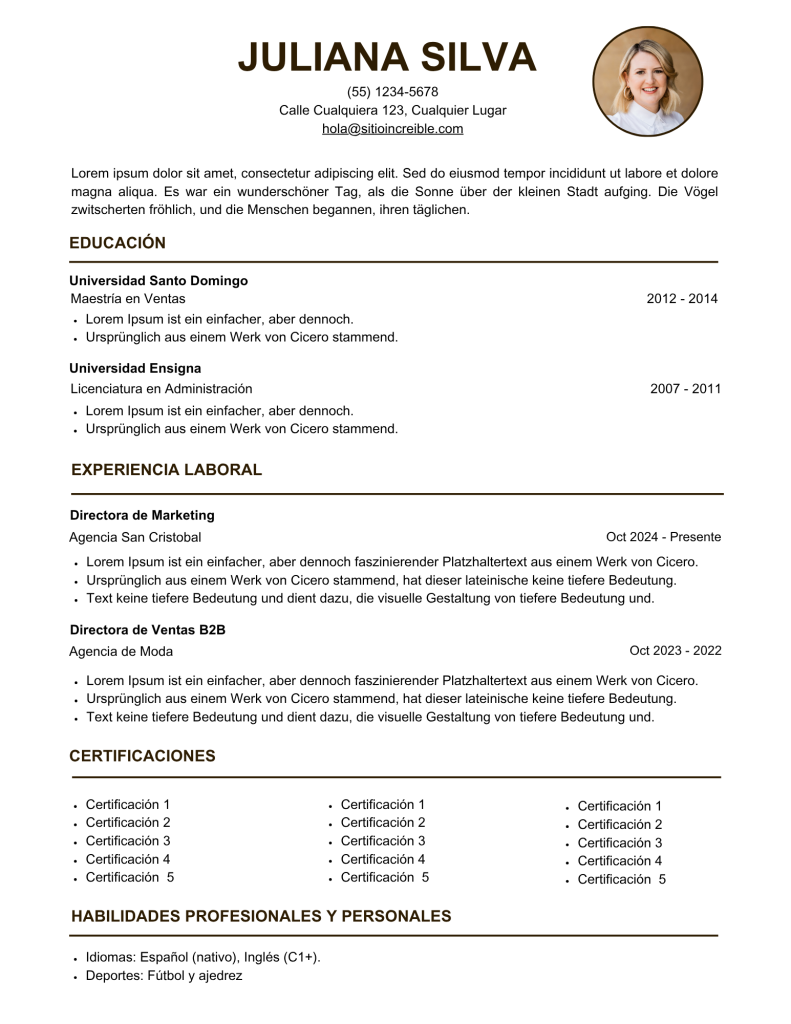
Finding the right resume template can take hours. To help you get started quickly, I’ve curated a collection of free editable Canva resume templates. Each one opens directly in Canva — click the image to customize and download your resume instantly.
These templates are 100% free and work with a free Canva account. I’ve also included a brief description of who each template is best for so you can pick the one that fits your career goals. These templates are 100% free and work with a free Canva account. Make your resume even stronger with our AI Resume Builder.
Build a Free ATS-Friendly Resume
Create a polished, job-ready resume with AI-powered bullet points and professionally designed templates. Optimized for applicant tracking systems and real hiring managers. Free to get started.
Create My Free Resume →Trusted by job seekers building resumes that pass ATS screening




Don’t miss out on our for jobseekers! Whether you’re polishing your resume, tracking job applications, or crafting the perfect cover letter, you’ll find everything you need in one convenient place.
These free Canva resume templates are a fast and easy way to create professional-looking resumes. Each template is fully editable and works with a free Canva account, so you can personalize your resume to match your skills, experience, and style. Whether you’re a student, creative professional, or corporate job seeker, these templates provide a strong starting point for your job application.
While these templates help you get started quickly, our AI-powered resume builder can take your resume even further. It offers personalized suggestions, ATS-friendly formatting, and professional layouts to help your application stand out. Try the AI resume builder to turn your resume into a smart, optimized tool for landing interviews.
How to Use These Free Canva Resume Templates
Step 1: Choose a Template
Browse the collection above and pick the template that best fits your industry, experience level, and personal style.
Step 2: Click the Image
Click on the template image you want. This will open the Canva template in a new tab.
Step 3: Open as a Template
When Canva opens, click “Use this template.” This will create a copy in your Canva account, leaving the original template intact.
Step 4: Customize Your Resume
Edit the text, fonts, colors, and layout to match your personal brand and career goals. Replace placeholder information with your own details, like work experience, education, and skills.
Step 5: Download Your Resume
Once you’re happy with your design, click Download in the top right corner of Canva. Choose your preferred format, such as PDF for applications or PNG for sharing online.
Step 6: Optional – Optimize with AI
If you want to take your resume a step further, try our AI-powered resume builder to ensure your resume is ATS-friendly and professionally formatted.
If you’d like to make your resume even more polished, our AI-powered resume builder can give you extra guidance. It helps with formatting, tailoring your content to your industry, and ensuring your resume is easy to read and ATS-friendly — all in just a few minutes.
Learn more in our Ultimate Guide to AI-Powered Resume Builders.
Check out tips for creating an interview-ready resume.
FAQ
Yes! All the resume templates listed here are completely free and editable with a free Canva account. You don’t need Canva Pro to customize and download them.
You can easily edit any template by changing fonts, colors, layouts, and text. Replace placeholders with your own work experience, skills, and education to make your resume unique.
Absolutely. Every template on this page uses only free Canva elements, so you can create a professional resume without paying for Canva Pro.
While the templates are visually professional, formatting alone may not guarantee ATS compatibility. For an ATS-friendly, fully optimized resume, consider using our AI resume builder to tailor your resume to job applications.
Canva Resume Templates vs. ResumeShaperAI: Which Is Right for You?
Both Canva templates and ResumeShaperAI are valuable tools for creating resumes, but they serve slightly different purposes depending on your goals and workflow.
Canva Resume Templates
Great for design and creativity: Canva allows you to choose from a variety of visually appealing templates.
Highly customizable: Change fonts, colors, layouts, and graphics to match your personal brand.
Free or low-cost: Many templates are completely free, making it accessible to everyone.
Manual process: You’ll need to format text, structure sections, and ensure your resume is ATS-friendly on your own.
ResumeShaperAI
Optimized for hiring systems: Automatically formats resumes to be readable by Applicant Tracking Systems (ATS).
Personalized content suggestions: Offers guidance on phrasing, achievements, and industry-specific wording.
Time-saving: Helps you build a professional resume quickly without worrying about formatting or layout.
Less focus on creative design: While it produces polished, professional resumes, it doesn’t offer as many visual customization options as Canva.
Which Should You Choose?
Use Canva templates if you want full creative control and a visually striking resume, or if you enjoy customizing layouts and design.
Use ResumeShaperAI if you want a quick, professional, and ATS-optimized resume without worrying about formatting or industry-specific phrasing.
For many job seekers, the easiest solution is to combine the two approaches: start with a free Canva template for design, then refine your content and structure with ResumeShaperAI to ensure your resume is both eye-catching and effective for recruiters.

Create the Best Resume for Every Job, In Less Time.
Craft a professional, recruiter-ready resume in minutes with our AI-powered resume builder. From formatting and phrasing to keyword optimization, ResumeShaperAI ensures your skills and experience stand out, pass ATS scans, and get you noticed by hiring managers.

Let AI Write Your Next Cover Letter. Free.
Save time, reduce stress, and create a letter that perfectly matches your resume and target role.
No Technical Skills Required.
Just answer a few questions and let AI do the rest. No technical knowledge required.
Whether you’re fresh out of college or a skilled professional, you can start creating high-quality resumes with just a few clicks with our AI powered resume builder.

Simple and Transparent Pricing.

ResumeShaperAI is your all-in-one AI-powered career tool designed to help job seekers create professional, ATS-friendly resumes and cover letters in minutes. Our mission is to simplify the job search process with smart automation and beautifully designed templates.
Made by ResumeShaperAI. All Rights Reserved 2026.